
 Rackmount PC
 Embedded Computing
 Industrial Portable Computers
 Rugged Tablets
 Rugged Laptop
 Industrial Panel PC
 Rugged Handheld
 Advantech Industrial PC
Best Rugged Tablet For Construction Sites And Contractors, Wokers
Table of Contents
- What to Look for in a Rugged Tablet for Construction?
- Why Rugged Tablets Outperform Consumer Tablets for Construction Work?
- Top Rugged Tablets for Construction Sites and Contractors, Workers
- Benefits of Using Rugged Tablets on Construction Sites and for Workers
- Choosing the Right Rugged Tablet for Your Construction Business
- FAQ

In the construction industry, having the right tools is essential for productivity and efficiency. One of the most valuable tools on modern job sites is the rugged tablet, which combines durability with advanced technology to withstand the harsh conditions of construction environments. Rugged tablet pc oem are specifically designed for contractors, offering resistance to dust, water, extreme temperatures, and drops. These tablets provide real-time data access, enhancing communication and project management from the field to the office. Key features such as MIL-STD-810G certification for military-grade durability and IP ratings for waterproofing ensure that these devices can handle the toughest job sites. Click here for military laptop for sale and military rugged tablet PC .
Choosing the best rugged tablet for your construction site involves understanding which features are most important, such as sunlight-readable screens, long battery life, and high performance for running construction software. This guide will help you identify the top rugged tablets that offer a balance of durability, performance, and connectivity to meet the demands of your business.

1. What to Look for in a Rugged Tablet for Construction?
In the real world, tablet construction devices must handle not just documents, but also dust, water, and daily movement between indoor and outdoor sites. When selecting the best tablet for construction, contractors should check both physical durability and workflow compatibility. Features such as glove-touch screens, anti-glare displays, and long battery life make a big difference during long shifts. A well-designed stand or hand strap can also improve mobility, allowing workers to record data or take photos without worrying about dropping the device.
Beyond the hardware, software integration plays an equally important role. A construction tablet that can sync with project management tools, BIM viewers, or inspection checklists helps teams stay connected. For instance, tablets running Windows allow easy use of desktop engineering software, while iPads or Android tablets are great for quick annotation, remote communication, or accessing cloud-stored blueprints.
Durability Standards
- MIL-STD-810G/H Certifications : These military-grade standards ensure the tablet can withstand extreme conditions, including drops, shocks, vibrations, and temperature extremes.
- IP Ratings: Look for tablets with IP65 or higher to guarantee protection against dust and water, ensuring the device can survive rain, dust storms, and even accidental submersion.
Display Features
- Sunlight-Readable Screens: Construction work often happens outdoors, so opt for tablets with anti-glare technology and high brightness levels (at least 800 nits), ensuring visibility under direct sunlight. Click here for Sunlight Readable Rugged Tablet .
- Glove and Wet Touch Compatibility: Tablets should be operable while wearing gloves or in wet conditions, a critical feature for contractors working in various environments.
Battery Life and Hot-Swappable Batteries
- Long Battery Life: A rugged tablet must last through long work shifts, typically requiring 10+ hours of battery life.
- Hot-Swappable Batteries: These allow you to change batteries without powering off the device, ensuring continuous operation on the job.
Performance and Processing Power
- Powerful Processors: Tablets with Intel Core i5/i7 or Octa-core processors can run construction-specific applications like AutoCAD or GIS mapping software smoothly.
- Adequate RAM and Storage: For optimal performance, select tablets with at least 8GB of RAM and 256GB of storage, ensuring they can handle large files and intensive multitasking.
2. Why Rugged Tablets Outperform Consumer Tablets for Construction Work?
While standard tablets may seem cost-effective at first, they often fall short in demanding environments. The best tablet for construction work is purpose-built to handle dust, vibration, moisture, and temperature changes that are common on job sites.
Rugged tablets reduce the risk of device failure, lower replacement costs over time, and provide more consistent performance in harsh conditions. For contractors managing multiple projects, this reliability translates into better productivity and fewer technical disruptions.
Choosing a rugged tablet is not just about durability—it is about ensuring continuity in daily construction operations.
3. Top Rugged Tablets for Construction Sites and Contractors, Workers
Samsung Galaxy Tab Active4 Pro
- MIL-STD-810G certification for shock and vibration resistance
- IP68 rating for water and dust protection
- 10.1-inch sunlight-readable display
- Replaceable battery with up to 12 hours of battery life
- CPU:Intel Skylake M3-6Y30/M3-7Y30/8200Y
- Display:10.1-inch screen, equipped with 1920*1200 screen resolution
- Battery Capacity: 7.4V/5000mAh.
- Data:WIFI+Bluetooth+3G/4G
- Size:280*187*22mm
- Weight only 1014g
- MIL-STD-810G certification&IP65 certification
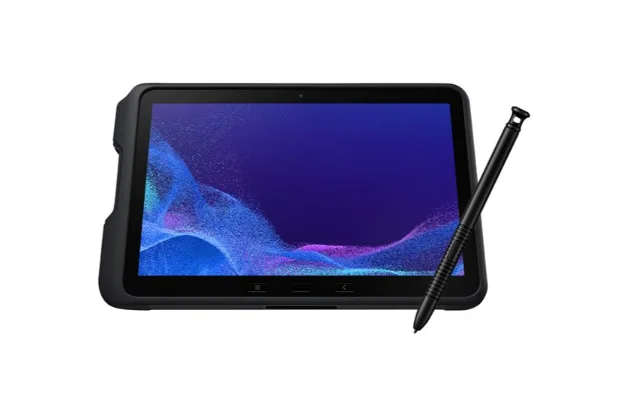
Why It’s Ideal: Compact, lightweight, and built for both field work and office tasks.
SINSMART SIN-I1008HE-6Y30

Why It’s Ideal:
Getac UX10
- IP65 and MIL-STD-810G certified
- Intel Core i5/i7 processors for high-performance computing
- 10.1-inch LumiBond® 2.0 display with exceptional brightness
- Dual hot-swappable batteries
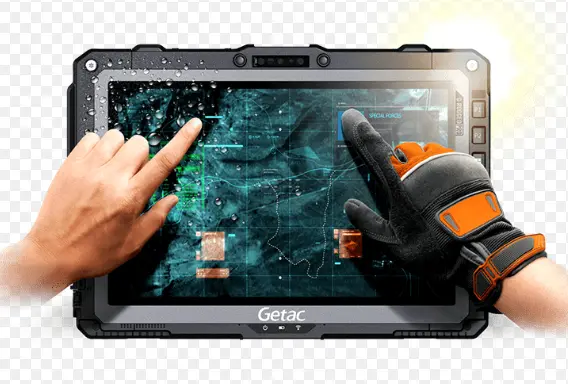
Why It’s Ideal: Offers high durability and performance, perfect for harsh environments.
Panasonic Toughbook FZ-G1
- 12-hour battery life with hot-swappable options
- MIL-STD-810G certified with IP65 rating
- 10.1-inch WUXGA display for outdoor visibility
- Powered by Intel Core i5 processor and up to 16GB RAM

Known for robust design and ability to handle intensive construction software.
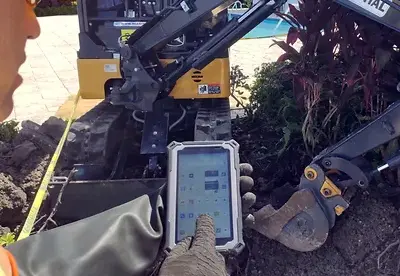
TRIPLTEK Tablet 7″ PRO
- 1200 nits sunlight-readable display
- 8GB RAM and 128GB storage
- Built-in GPS and 4G LTE connectivity
- Rugged design with military-grade construction
4. Benefits of Using Rugged Tablets on Construction Sites and for Workers
Investing in a rugged tablet for construction sites offers numerous advantages that directly enhance productivity, efficiency, and safety. These devices are specifically designed to handle the tough conditions of a job site, ensuring that contractors can work without worrying about damage to their tools.
Enhanced Productivity and Efficiency
Rugged tablets streamline data entry and access to real-time information, reducing the need for paperwork. This allows contractors to view blueprints, update project timelines, and communicate instantly with the office, leading to faster decision-making and project progression.
Features such as barcode scanners, built-in cameras, and GPS integration aid in inventory management, site documentation, and precise project tracking.
Improved Communication and Collaboration
Construction tablets are no longer only for individual use — they help improve teamwork and safety compliance. Using a tablet for construction allows supervisors to document progress with photos and notes, instantly share updates with office staff, and access digital safety manuals. In case of an inspection, having all records stored on a rugged tablet ensures quick access even in dusty or wet conditions.
By combining durable hardware and reliable software, the best tablets for construction sites become more than just tools — they serve as a bridge between fieldwork and digital project management. This integration supports faster communication, reduces paperwork, and helps teams deliver higher-quality results on time.
4G LTE connectivity enables team members to stay connected, whether in the field or in remote areas. Video calls, instant messaging, and collaborative apps help foremen and project managers coordinate seamlessly.
Durability and Cost-Effectiveness
With MIL-STD-810G certifications and IP ratings , these tablets withstand dust, water, extreme temperatures, and drops, reducing the need for frequent repairs or replacements. This durability translates into long-term cost savings for construction companies.
Hot-swappable batteries ensure that devices remain operational throughout long work shifts, minimizing downtime.
By integrating rugged tablets into construction operations, businesses benefit from greater efficiency, improved team coordination, and a more cost-effective approach to managing projects in challenging environments.
5. Choosing the Best Rugged Tablet for Your Construction Business
When selecting the best rugged tablet for construction work, real-world usage matters as much as specifications. On active job sites, tablets are commonly used for drawing reviews, progress tracking, safety checks, and on-site communication. A rugged tablet allows supervisors and contractors to move freely between indoor offices and outdoor environments without switching devices.
For example, during foundation or structural phases, tablets are often used to view blueprints, zoom into details, and mark changes in real time. In later stages, they help with punch lists, photo documentation, and coordination between teams. A rugged device reduces downtime caused by screen damage, water exposure, or accidental drops.
Evaluating Project-Specific Needs
- Environment: Consider the work environment where the tablet will be used. Construction sites often expose tablets to dust, water, and extreme temperatures, so choosing a tablet with at least an IP65 rating and MIL-STD-810G certification is essential for durability. You may be interested in our IP65 Android tablet options.
- Usage: Determine how the tablet will be used. Will it be for viewing blueprints, site documentation, or running construction software like AutoCAD? If so, you’ll need a device with a high-performance processor, such as Intel Core i5/i7, and 8GB or more of RAM.
Operating System Considerations for Construction Workflows
Not all construction teams use the same software. This is why operating system choice plays a key role when evaluating the best tablet for construction work.
Windows-based rugged tablets are often preferred by engineers and project managers who rely on full desktop programs, such as CAD tools, Excel spreadsheets, or custom industry software. These tablets integrate smoothly with existing office systems and allow file handling similar to a laptop.
Android rugged tablets, on the other hand, are widely used by field workers for inspections, checklists, task assignments, and cloud-based construction apps. They are usually easier to deploy in large teams and support fast onboarding with minimal training.
Battery Endurance for Long Workdays
Battery life is often underestimated when choosing the best tablet for construction work. Many construction sites do not provide easy access to charging points, especially in early project stages or outdoor locations.
Rugged tablets typically feature larger batteries than consumer devices. Some models are designed to last an entire shift or more on a single charge. Others support hot-swappable batteries, allowing work to continue without shutting down the device. This feature is especially useful for long inspections, night shifts, or remote construction areas.
A stable battery reduces interruptions and ensures that critical data is not lost during work.
Accessories That Improve On-Site Efficiency
Accessories can significantly improve how a tablet performs on a construction site. When evaluating the best tablet for construction work, it is important to look beyond the device itself.
Common accessories include hand straps for safer handling at heights, vehicle mounts for machinery or trucks, and detachable keyboards for data entry. Styluses are also useful for marking drawings or signing digital documents, even when wearing gloves.
These accessories help adapt the tablet to different roles on-site, from foremen and inspectors to engineers and logistics staff.
Documentation Accuracy
Rugged tablets also play a significant role in improving documentation accuracy. Workers can take high-resolution photos, record measurements, or upload defect reports in real time. This reduces the errors that often occur when handwritten notes are submitted at the end of the day. With cloud backup enabled, teams no longer lose important records due to weather or accidental drops.
Budget and Total Cost of Ownership
When comparing options, it’s worth considering the total ownership cost instead of just the purchase price. Some of the best tablets for construction might seem expensive at first, but they often reduce repair downtime and data loss in the long run. Rugged tablets with hot-swappable batteries and modular accessories can extend their usable life across multiple projects, making them a smart investment for field teams.
Companies managing several job sites may also benefit from standardized tablet setups. This ensures consistent app compatibility, faster training for new workers, and easier IT support. If a project requires precise GPS tracking, barcode scanning, or wireless data transfer, choosing a model with integrated sensors or expandable ports can simplify on-site workflows. This ensures workers always have updated guidance, especially when handling heavy machinery or hazardous materials.
Another aspect many contractors overlook is serviceability. Construction environments can be unpredictable, so selecting a tablet with easy maintenance, accessible screws, or replaceable ports can reduce long-term downtime. If your business needs long-term use across multiple projects, consider a model with strong after-sales support or explore our rugged tablet OEM customization for extended lifecycle options.
- Upfront Costs vs. Long-Term Savings: While rugged tablets may have a higher upfront cost, they offer long-term savings by reducing the need for frequent repairs and replacements. Consider the total cost of ownership (TCO), including accessories, maintenance, and potential downtime costs.
- Battery Life: Tablets with hot-swappable batteries ensure continuous operation, a critical feature for minimizing downtime during long shifts.
Prioritizing Key Features
When deciding which device is the best tablet for construction workers, it is helpful to think about how your team manages data across different sites. If your projects involve frequent photo documentation or scanning large PDF drawings, choose a tablet with expandable storage. Models that support microSD cards or removable SSDs give more flexibility over time.
- Connectivity: Ensure the tablet has 4G LTE, Wi-Fi, and Bluetooth for real-time communication and data transfer between the field and office.
- Display: Opt for a sunlight-readable display with anti-glare and glove touch functionality to ensure usability in various conditions. If your business relies on a specific operating system, consider options like a Windows 10 industrial tablet or a rugged tablet with Windows 11 .
For teams that use both office and field tools, choosing a Windows rugged tablet ensures compatibility with desktop engineering software. On the other hand, Android rugged tablets are often more lightweight and easier to use for routine inspections or reporting tasks. Your final choice depends on which applications your workers rely on every day.
FAQ
-
Q1. What does “tablet construction” mean in the context of the building industry?
-
Q2. What makes a tablet suitable for construction sites?
-
Q3. What is the difference between a consumer tablet and a rugged tablet for construction?
-
Q4. Which operating system is better for tablet construction—Windows, iOS, or Android?
-
Q5. What are the essential specs to look for when choosing the best tablet for construction?
-
Q6. Are rugged tablets worth the higher price for construction work?
-
Q7. How can tablets improve collaboration and safety on construction sites?
-
Q8. What accessories enhance the use of a tablet in construction?
-
Q9. How should I decide which is the best tablet for construction for my team?
-
Q10. Can a single tablet type meet all construction requirements?
A: Not really. Each construction role—project manager, site engineer, inspector—may have different needs. The best approach is to match the device’s durability, software compatibility, and usability to the specific tasks it will perform. -
Q11. What is the best tablet for construction?
A: The best tablet for construction depends on your work needs and environment. For design review and PDF markup, the iPad offers smooth performance and great app support. For running full software like AutoCAD or Revit, a Windows tablet is ideal. If you work in harsh outdoor conditions, a rugged tablet with IP65+ protection and MIL-STD-810H durability is the best choice. In short, the best tablet for construction is one that combines durability, performance, and software compatibility for your specific job site. -
Q12. Should construction teams choose a bigger screen or a more portable tablet?
-
Q13. How can companies extend the lifespan of their rugged tablets?
A: Use protective bumpers, install screen protectors, ensure regular software updates, and choose models with replaceable batteries. Proper maintenance can significantly improve long-term reliability.


LET'S TALK ABOUT YOUR PROJECTS
- sinsmarttech@gmail.com
-
3F, Block A, Future Research & Innovation Park, Yuhang District, Hangzhou, Zhejiang, China
Our experts will solve them in no time.