
 Rackmount PC
 Embedded Computing
 Industrial Portable Computers
 Rugged Tablets
 Rugged Laptop
 Industrial Panel PC
 Rugged Handheld
 Advantech Industrial PC
Best Tablets for Field Work and Service Technicians
Field technicians and service personnel need tools that can survive hard conditions and give great performance in today's fast-paced, technology-driven work environments. One of the most important tools is the rugged tablet, which is a durable, portable computer device built to operate consistently in harsh outdoor and industrial conditions. Whether you operate in construction, utilities, logistics, or emergency services, the appropriate tablet can increase field productivity, reduce downtime, and improve real-time communication with centralized teams.
Table of Contents
- Why Field Service Technicians Need a Rugged Tablet?
- Core Features of Rugged Tablets
- Benefits of Using Rugged Tablets
- Top Factors to Consider When Choosing a Tablet for Field Work
- Top Use Cases and Industry Applications
- Best Rugged Tablets for Field Technicians in 2025
- Tips for Choosing the Right Tablet for Your Needs
- FAQ
Why Field Service Technicians Need a Rugged Tablet?
Core Features of Rugged Tablets
Rugged tablets are designed to withstand extreme conditions that would damage conventional devices. Key features include:
- Enhanced Durability: Built with reinforced chassis and robust materials to survive drops, shocks, vibrations, and physical impacts.
- Environmental Protection: Rated with Ingress Protection (IP) codes (e.g., IP67, IP68, IP69K) to ensure resistance against dust, water immersion, and high-pressure washdowns. Many also comply with MIL-STD-810 military standards for performance under harsh environmental stresses like temperature extremes and humidity.
- Sunlight-Readable Displays: High-brightness screens (often exceeding 500 nits) with anti-glare coatings are critical for maintaining visibility in direct sunlight, a common requirement for outdoor work.
- Glove and Wet-Condition Operation: Advanced touchscreen technology allows reliable input even when users are wearing gloves or working in wet conditions.
- Extended Battery Life: Significantly larger batteries provide long operational times, often lasting multiple days on a single charge, which is essential for extended fieldwork where charging opportunities are limited. Some models support hot-swappable batteries for continuous operation.
- Integrated Peripherals: Many models come equipped with built-in barcode scanners, RFID readers, or specialized ports for connecting external tools and sensors, streamlining data capture and workflow efficiency.
Benefits of Using Rugged Tablets
The investment in rugged technology offers several advantages:
- Increased Productivity: Workers can access digital forms, blueprints, and databases on-site, eliminating paper-based processes and reducing errors from manual data entry.
- Improved Reliability: The ability to function reliably in adverse conditions minimizes downtime and costly device failures.
- Enhanced Safety and Compliance: Durable devices ensure critical information is always available, supporting safety protocols and regulatory compliance in industries like healthcare and defense.
- Long-Term Cost Savings: Despite a higher initial cost, their extended lifespan and reduced need for repairs or replacements lead to lower total cost of ownership over time.
Top Factors to Consider When Choosing a Tablet for Field Work
Choosing the best tablet for field work involves more than just comparing specs — it’s about ensuring the device will survive and perform in real-world conditions. Whether you're a maintenance technician, field engineer, or HVAC specialist, understanding the essential features of a rugged tablet helps match technology to your operational needs. Below are the key aspects to prioritize when evaluating tablets for service technicians.
Durability and Rugged Ratings
Display: Outdoor Visibility and Glove Support
Battery Life and Swappable Options
Connectivity: Always-On Communication
Performance and Storage
Operating System: Windows vs Android
Mounting and Accessories
A rugged tablet is often part of a larger ecosystem. Useful add-ons include:
- Vehicle docking stations
- Keyboard attachments
- Shoulder straps or hand straps
- Styluses or active pens
Top Use Cases and Industry Applications
1. Utilities and Energy
2. Construction and Civil Engineering
3. Logistics and Fleet Management
4. Field Service and Maintenance
5. Public Safety and Emergency Response
Best Rugged Tablets for Field Technicians in 2025
Selecting the correct rugged tablet can significantly improve field technicians' efficiency, data accuracy, and mobility. In 2025, numerous manufacturers will offer high-performance tablets designed exclusively for the industrial, logistics, utilities, construction, and public safety industries. These devices combine durability, connection, and performance to satisfy the changing needs of field operations.
Getac UX10

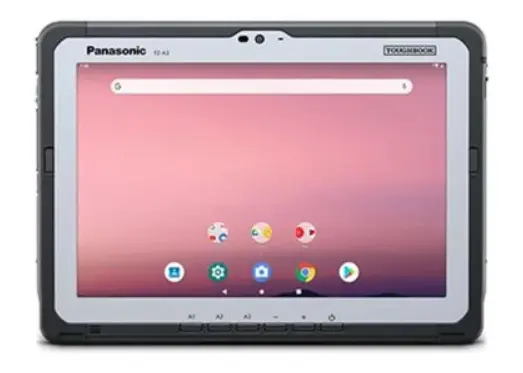
Panasonic Toughbook A3
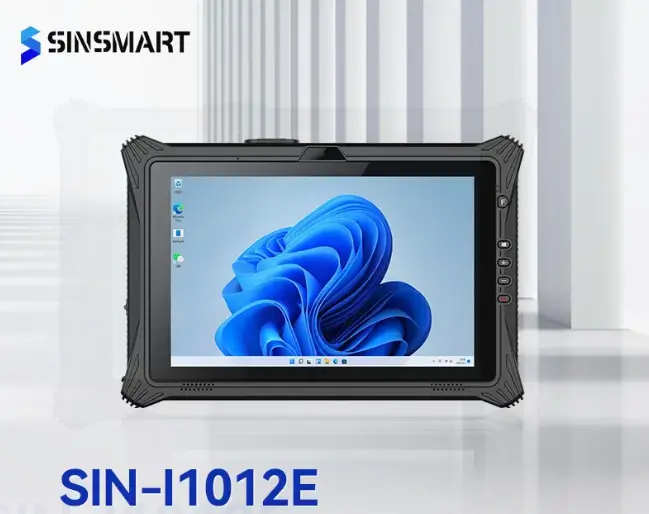
SINSMART SIN-I1012E
Tips for Choosing the Right Tablet for Your Needs
1. Match the Tablet to the Work Environment
2. Determine OS and Software Compatibility
3. Consider Total Cost of Ownership (TCO)
4. Evaluate Connectivity and Expandability
5. Prioritize Battery Life and Swap Options
For field teams working away from charging stations, a tablet with a hot-swappable battery ensures uninterrupted operation. This feature allows you to replace a drained battery without shutting down the device—especially useful for long shifts or mission-critical work.
6. Factor in Ergonomics and Accessories
7. Specialized Input Flexibility
Touchscreen usability goes beyond sensitivity. Look for models that support input while:
- Wearing gloves
- Working with wet or dirty hands
- Using a stylus for accurate field annotations or signatures
Physical shortcut buttons (e.g., programmable keys) can also be critical in industrial roles where accessing an app quickly matters more than touchscreen gestures.
Tablet Evaluation Checklist
| Consideration | Must-Have Feature |
|---|---|
| Performance & Memory | Fast processor (e.g., Intel/Qualcomm), 8GB+ RAM, SSD storage |
| OS Compatibility | Windows (desktop software), Android (mobile apps), custom Linux |
| Durability | MIL-STD-810G/H, IP65–IP68, , reinforced chassis |
| Connectivity | LTE/5G, Wi-Fi 6, GPS, optional NFC/RFID |
| Battery Performance | 8–12+ hours typical use, hot-swappable battery support |
| Expandability | Ports: USB, HDMI, RJ45, RS232 |
| Accessories | Glove-compatible, Vehicle docks, hand straps, carry cases, pole mounts, detachable keyboard |
| Security Features | TPM, fingerprint reader, encryption, remote wipe |
| Weight & Size | 7–12 inches for mobility; <1.5 kg for efficiency |
| Support & Warranty | 2–3 years standard, optional extended coverage |
Or you can ask yourself these question:
- Can the tablet withstand drops, vibration, and pressure?
- Which OS supports your business apps and workflows?
- Will you use it under direct sunlight or outdoors?
- Will it be used with gloves, stylus, or in wet environments?
- Will the device last all day under heavy use?
- Can it handle your software without lag?
- Do you need internet, GPS, or data transfer in the field?
- Do you need to connect peripherals like scanners or tools?
- Does it support mounting, docking, or wearable use?
- Does it support your GIS, diagnostic, or asset software?
- Will it be handheld or mounted?
- Do you need data protection in risky environments?
FAQ
1. What makes the best tablet for field work different from consumer tablets?
The best tablet for field work is built to survive harsh conditions like drops, vibrations, extreme temperatures, and exposure to dust or water—features not typically found in consumer tablets. Rugged models offer durability, long battery life, sunlight-readable screens, and support for gloves or stylus use.
2. Which operating system is better for field work—Windows or Android?
It depends on your workflow. Windows tablets are ideal for running advanced desktop software or integrating with office systems. Android tablets are better for lightweight apps, simple workflows, and budget-friendly solutions.
3. What screen features should I look for in a tablet for outdoor use?
A sunlight-readable display (usually 500 nits or higher) with anti-glare coating helps maintain visibility outdoors. Glove or wet-touch support is also essential in many field jobs.
4. How important is battery life for field technicians?
Extremely important. Long-lasting batteries reduce downtime, especially for full-day fieldwork. Hot-swappable battery support is a major benefit in remote environments without charging access.
5. Can tablets replace laptops for field service applications?
Yes, in many cases. A rugged tablet with a detachable keyboard, fast processor, and relevant ports can function as a mobile workstation while offering greater portability and better handling in tight or outdoor spaces. See our Industrial Laptop Solutions for comparison.
6. What kind of connectivity does the best tablet for field work offer?
Look for dual-band Wi-Fi, Bluetooth, and optional 4G/5G mobile data. GPS/GNSS modules are valuable for mapping, surveying, and location-based apps.
7. Do rugged tablets support professional tools like barcode scanners or RFID readers?
Yes. Many rugged tablets integrate scanners, NFC, RFID, or even RS232 ports for connecting diagnostic tools or industrial equipment.
8. What accessories improve usability for service technicians?
Common add-ons include shoulder straps, vehicle docks, pole mounts, protective boots, and detachable keyboards. These enhance mobility, workflow, and productivity in different work scenarios.
9. Where can I find customizable rugged tablets for my business?
If you need branding, specialized ports, or application-specific integrations, contact us to learn more about Tablet PC OEM Solutions that match your field requirements.


LET'S TALK ABOUT YOUR PROJECTS
- sinsmarttech@gmail.com
-
3F, Block A, Future Research & Innovation Park, Yuhang District, Hangzhou, Zhejiang, China
Our experts will solve them in no time.