
 Rackmount PC
 Embedded Computing
 Industrial Portable Computers
 Rugged Tablets
 Rugged Laptop
 Industrial Panel PC
 Rugged Handheld
 Advantech Industrial PC
Blog
How Do Industrial PCs Improve Production Line Efficiency?
2026-07-24
Table of Contents
- I. Introduction
- II. What Is an Industrial PC in a Production Line?
- III. Six Ways an Industrial PC Improves Production Line Efficiency
- IV. How Industrial PCs Reduce Production Downtime
- V. Improving Quality with Machine Vision and Edge AI
- VI. Connecting PLC, SCADA, HMI, and MES Data
- VII.Choosing the Right Industrial PC Form Factor
- VIII. Industrial PC Selection Checklist for Production Lines
- IX. Deployment Practices That Protect Efficiency Gains
- X. Build a Production-Line Industrial PC Specification
- XI. FAQ
Introduction
Introduction
An industrial PC improves production line efficiency by processing control, vision, and sensor data close to the equipment, connecting machines to higher-level software, and operating reliably where an office computer may struggle. The practical gains are faster decisions, more consistent cycles, earlier fault detection, better quality control, and less time lost to computer-related failures.
This role is becoming more important as factories invest in connected operations. Deloitte reported in its 2026 Manufacturing Industry Outlook, published in late 2025, that 80% of 600 surveyed manufacturing executives planned to direct at least 20% of their improvement budgets to smart manufacturing, including automation hardware, sensors, analytics, and cloud computing (source). An industrial PC is often the local computing layer that turns those technologies into timely production action.
The hardware alone does not create efficiency. It must be matched to the application, integrated correctly, and measured against production KPIs. This guide explains where the improvement comes from and how to select a suitable platform.
What Is an Industrial PC in a Production Line?
What Is an Industrial PC in a Production Line?
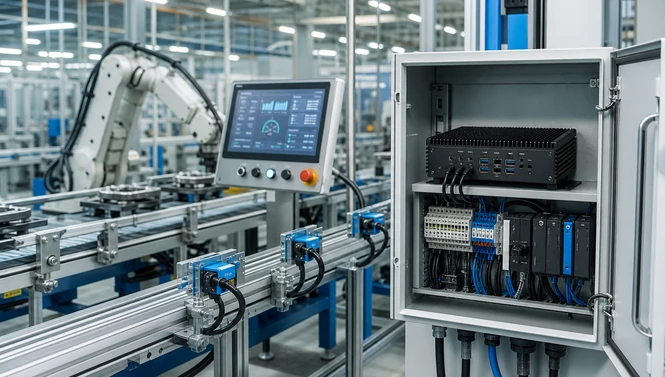
An industrial PC is a computer designed for control, monitoring, data acquisition, visualization, or edge processing in an industrial environment. Compared with a typical office PC, it may use a fanless enclosure, more secure connectors, industrial power input, wider environmental tolerances, and longer-availability components.
On a production line, the industrial computer can serve several roles:
-
run an HMI or SCADA application;
-
supervise PLC-controlled equipment;
-
collect data from sensors, cameras, drives, and controllers;
-
process machine-vision images;
-
execute local analytics or AI inference;
-
exchange production data with MES, historian, or cloud systems;
-
store recipes, events, alarms, and quality records.
The PLC still handles deterministic machine logic in many architectures. The industrial PC complements it with richer software, visualization, storage, connectivity, and computing power. In PC-based control systems, one platform may perform several of these functions.
Six Ways an Industrial PC Improves Production Line Efficiency
Six Ways an Industrial PC Improves Production Line Efficiency
The efficiency gain comes from removing delay, variability, information gaps, and avoidable stoppages.
|
Industrial PC function
|
Operational effect
|
KPI to watch
|
|
Local control and edge processing
|
Faster response without a cloud round trip
|
Cycle time, latency
|
|
Continuous data acquisition
|
Immediate visibility into abnormal conditions
|
Availability, alarm response time
|
|
Machine vision
|
Automated, repeatable inspection
|
First-pass yield, defect escape rate
|
|
Condition monitoring
|
Earlier warning of wear or failure
|
Unplanned downtime, MTBF
|
|
MES/SCADA connectivity
|
Less manual recording and better traceability
|
Schedule adherence, data completeness
|
|
Rugged continuous operation
|
Fewer computer-related interruptions
|
OEE availability, support incidents
|
1. Faster local decisions
When a camera detects a misplaced part or a sensor reports an out-of-range value, a local industrial PC can process the event near the machine. It can display an alarm, trigger a software response, log the event, or pass a command to the control layer without waiting for remote processing. This low-latency design is important for high-speed inspection, robot guidance, and synchronized production cells.
2. Consistent automated workflows
An industrial PC can coordinate recipes, inspection parameters, operator instructions, and data records. Automation reduces the variation created by manual settings and disconnected procedures. Changeovers become easier to standardize, especially when the correct product recipe and inspection thresholds are loaded together.
3. Better use of production data
Machine data has little value if it remains inside isolated controllers. An industrial PC can normalize signals, add timestamps and production context, and send useful information to dashboards or a manufacturing execution system. Supervisors can then see whether a loss comes from a fault, a slow cycle, a material shortage, or a changeover.
How Industrial PCs Reduce Production Downtime
How Industrial PCs Reduce Production Downtime
How Industrial PCs Reduce Production Downtime
Downtime reduction begins with visibility. The computer can collect vibration, temperature, current, pressure, cycle, and alarm data continuously. Rules or analytics can then identify drift before it becomes a stop.
For example, rising motor vibration may prompt inspection during a planned break rather than after a bearing failure. Repeated drive alarms may reveal a process problem that operators previously reset without recording. Local storage also preserves evidence when an upstream network is unavailable.
A fanless design can remove a moving part and reduce the path for dust intake, but it is not automatically right for every workload. High-power GPU systems may need carefully engineered active cooling. Reliability depends on the complete thermal design, mounting position, ambient temperature, vibration, power quality, and maintenance plan.
For machine-side deployments, the SIN-3094-H610EFT fanless embedded industrial PC provides four 2.5GbE ports, four USB 3.2 Gen1 ports, NVMe storage, COM and DIO connectivity in a 212 x 165 x 45 mm chassis. Those verified features make it relevant where multiple cameras or networked devices must feed a compact local computer.

Improving Quality with Machine Vision and Edge AI
Improving Quality with Machine Vision and Edge AI
Improving Quality with Machine Vision and Edge AI
Improving Quality with Machine Vision and Edge AI
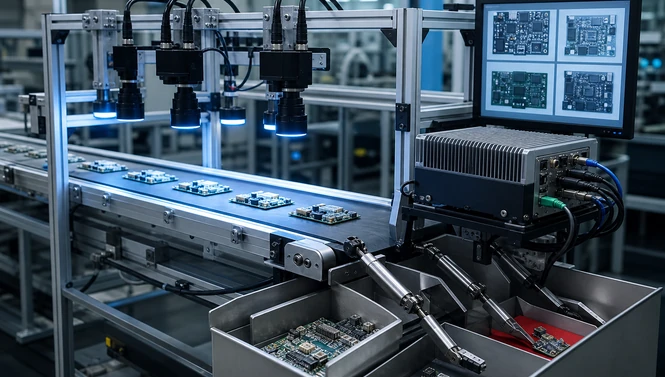
Manual inspection can be slow and inconsistent, especially at full production speed. A properly designed machine-vision system applies the same inspection logic to every part. The industrial PC acquires images, runs algorithms, records results, and communicates pass/fail decisions to the line.
Typical tasks include:
-
barcode and OCR verification;
-
presence and orientation checks;
-
dimensional measurement;
-
surface-defect detection;
-
robot guidance and alignment;
-
label, seal, and assembly verification.
The computer must match the camera count, interface, resolution, frame rate, algorithm, and retention policy. Basic rule-based inspection may run well on a compact CPU platform. Multi-camera inspection may require multiple LAN ports, frame grabbers, or PCIe expansion. Deep-learning inspection may benefit from a GPU or dedicated AI accelerator.
SINSMART’s machine vision computer category organizes options for industrial vision, AI, robotics, and automation. For heavier edge inference, the SIN-3322-A78AE Jetson edge AI industrial PC uses Jetson AGX Orin, offers 32GB or 64GB memory, includes 1GbE and 10GbE networking, and supports 12-36VDC input. These are useful public specifications for evaluating an AI inspection node; actual performance still depends on the model and workload.
Connecting PLC, SCADA, HMI, and MES Data
Connecting PLC, SCADA, HMI, and MES Data
Many factories contain equipment from different generations. One machine may expose serial data, another Ethernet, and another only a vendor-specific interface. An industrial PC can act as a controlled integration point between operational technology and information systems.
At the machine level, COM, USB, DIO, LAN, or expansion cards connect controllers and instruments. Software can convert protocols, validate data, and associate it with the current order or batch. At the supervisory level, the computer can provide an HMI or SCADA interface. At the enterprise boundary, it can forward approved records to MES, a historian, or an analytics platform.
This architecture improves efficiency when it eliminates manual transcription, reveals bottlenecks, and shortens response time. It can reduce efficiency if poorly secured or overcomplicated. Network segmentation, least-privilege access, tested updates, backups, time synchronization, and recovery procedures should be part of the design.
Choosing the Right Industrial PC Form Factor
Choosing the Right Industrial PC Form Factor
Choosing the Right Industrial PC Form Factor
The best industrial PC is the smallest and simplest platform that meets the workload, connectivity, environmental, expansion, and lifecycle requirements with adequate headroom.
|
Form factor
|
Best fit
|
Main trade-off
|
|
Fanless embedded PC
|
Machine-side control, data collection, compact vision
|
Limited internal expansion compared with rack systems
|
|
Rack-mount industrial PC
|
Multi-camera vision, add-in cards, centralized control
|
Larger cabinet and cooling requirement
|
|
Industrial panel PC
|
HMI, operator guidance, line-side visualization
|
Display and computer are serviced as one unit
|
|
Edge AI computer
|
Local deep-learning inference and advanced vision
|
Higher thermal and software-integration demands
|
For high expansion needs, the SINSMART 4U rack-mount industrial PC range includes configurations with multiple storage, network, USB, and expansion options. A rack platform is often appropriate when a vision system requires frame grabbers, a discrete GPU, several network cards, or easy internal service access.
For compact, newer AI-capable deployments, the SIN-31A4-H810 fanless mini PC supports Intel Core Ultra 200S processors, up to 64GB DDR5 memory, four 2.5GbE ports, NVMe storage, and a 212 x 165 x 63 mm enclosure. The live page lists robotic arms, AMRs, machine vision, and roadside cabinets as suitable applications.

Industrial PC Selection Checklist for Production Lines
Industrial PC Selection Checklist for Production Lines
Industrial PC Selection Checklist for Production Lines
Start with the process, not the processor name.
-
Define the task. Control, HMI, vision, data collection, AI inference, or several functions?
-
Quantify the workload. Record cycle time, camera resolution and frame rate, algorithm type, concurrent applications, and data retention.
-
List every interface. Include LAN speed, PoE requirements, USB, COM mode, DIO, fieldbus cards, display outputs, and wireless options.
-
Describe the environment. State ambient temperature, dust, vibration, humidity, washdown exposure, mounting orientation, and cabinet ventilation.
-
Plan power and grounding. Confirm DC range, transient protection, isolation needs, UPS strategy, and shutdown behavior.
-
Check expansion and serviceability. Plan GPU, frame grabber, NIC, storage replacement, and access clearance.
-
Validate software. Confirm operating system, drivers, real-time requirements, application licenses, cybersecurity controls, and recovery image.
-
Define lifecycle needs. Specify deployment volume, configuration control, spares, long-term availability, and change-notification expectations.
Avoid selecting solely on maximum CPU performance. Excess heat, insufficient I/O, the wrong camera bandwidth, or poor service access can erase the benefit of a faster processor.
Deployment Practices That Protect Efficiency Gains
Deployment Practices That Protect Efficiency Gains
Deployment Practices That Protect Efficiency Gains
Pilot the computer on a representative machine before a line-wide rollout. Test peak load, maximum camera traffic, hot ambient conditions, power interruption, network loss, and recovery from corrupted software or storage. Record CPU/GPU utilization, memory, storage write rate, temperature, latency, and error logs.
Create a controlled deployment image and document BIOS settings, drivers, application versions, network addresses, and cable assignments. Keep a tested spare or recovery path for bottleneck equipment. Schedule updates around production and validate them on an offline system first.
Most importantly, compare a baseline with post-deployment results. Useful measures include:
-
OEE availability, performance, and quality components;
-
unplanned downtime minutes;
-
mean time between failures and mean time to repair;
-
first-pass yield, scrap, and rework;
-
inspection cycle time and false-reject rate;
-
changeover duration;
-
alarm response time and data completeness.
An industrial PC should be considered successful when these operational measures improve without adding unacceptable maintenance or cybersecurity risk.
Build a Production-Line Industrial PC Specification
Build a Production-Line Industrial PC Specification
Build a Production-Line Industrial PC Specification
Industrial PCs improve efficiency by giving the production line reliable local computing, richer connectivity, and faster access to useful data. The strongest results come from matching the platform to a specific constraint: cycle time, inspection quality, downtime, integration, or operator visibility.
For a project recommendation, provide SINSMART with the machine function, software and operating system, camera or sensor list, required interfaces, installation space, ambient conditions, power input, expansion cards, storage needs, and expected order quantity. This information supports a more accurate standard-product or OEM/ODM configuration proposal.
FAQ
FAQ
FAQ
Q1: How does an industrial PC increase production output?
It processes machine data locally, supports consistent automated cycles, and exposes delays or faults sooner. Higher output follows when those capabilities reduce cycle loss, downtime, rework, or changeover time.
Q2: How do industrial PCs reduce production downtime?
They continuously collect alarms and condition data, support earlier fault detection, and provide local records for faster diagnosis. Rugged hardware can also reduce failures caused by factory heat, dust, vibration, or unstable power when correctly specified.
Q3: Is an industrial PC the same as a PLC?
No. A PLC is usually optimized for deterministic machine control. An industrial PC provides general-purpose computing, visualization, storage, analytics, and connectivity. Many systems use both, while some use PC-based control.
Q4: Can an industrial PC connect old machines to an MES?
Often, yes. Serial, Ethernet, USB, DIO, or expansion interfaces can collect legacy-machine data, while software translates and forwards approved records. Compatibility and cybersecurity must be verified for each machine.
Q5: What industrial PC is best for machine vision inspection?
A compact fanless model can suit basic or medium inspection. Multi-camera systems may need more LAN bandwidth or PCIe frame-grabber expansion. AI inspection may require a GPU, NPU, or Jetson-based edge computer.
Q6: When should a factory choose a rack-mount industrial PC?
Choose a rack system when the application needs several add-in cards, discrete graphics, large storage capacity, centralized service access, or more expansion than a compact embedded system provides.
Q7: Does a fanless industrial PC require no maintenance?
No. Removing a fan can reduce dust intake and one mechanical failure point, but connectors, storage, thermal paths, power systems, software, and enclosure cleanliness still need inspection and management.
Q8: Which specifications matter most for production-line use?
Workload, I/O, network bandwidth, expansion, power input, thermal limits, operating-system support, installation dimensions, serviceability, and lifecycle requirements matter more than CPU generation alone.
Q9: How should production-line efficiency be measured after deployment?
Compare the pre-deployment baseline with OEE, downtime, cycle time, first-pass yield, scrap, changeover time, alarm response, and maintenance workload after a representative operating period.
Q10: What information should I send for an industrial PC quotation?
Send the application, software, cameras and sensors, interface list, expansion cards, environmental conditions, power source, mounting space, storage, deployment quantity, and required configuration lifecycle.


LET'S TALK ABOUT YOUR PROJECTS
- sinsmarttech@gmail.com
-
3F, Block A, Future Research & Innovation Park, Yuhang District, Hangzhou, Zhejiang, China
Our experts will solve them in no time.