
 Rackmount PC
 Embedded Computing
 Industrial Portable Computers
 Rugged Tablets
 Rugged Laptop
 Industrial Panel PC
 Rugged Handheld
 Advantech Industrial PC
Industrial PC Storage Configuration Guide: Understanding M.2 and SATA Interface Compatibility
In modern industrial applications, industrial PCs (IPCs) play a mission-critical role, powering automation, control, and data processing tasks across diverse environments. However, many users face challenges when deploying storage solutions — particularly around the relationship between M.2 and SATA interfaces, matching the right protocols, and troubleshooting issues like “M.2 drive not detected.”
In this article, we take a deep dive into why these issues occur and how SINSMART’s industrial computers provide a complete solution that ensures smooth installation, compatibility, and reliable performance in demanding environments.
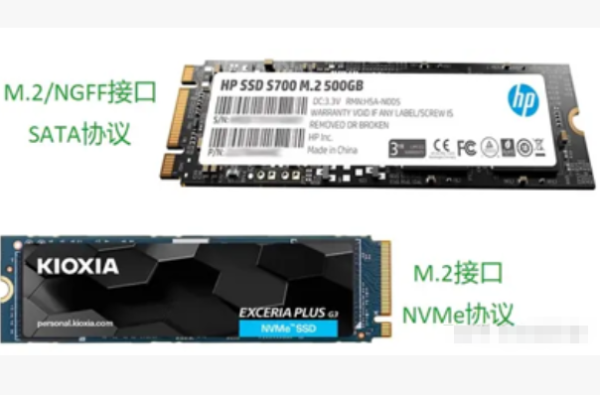
I. M.2 Drive Protocols: SATA or NVMe?
M.2 solid-state drives generally support two main protocols — SATA and NVMe — which differ significantly in performance and communication methods:
-
SATA Protocol – Utilizes the traditional SATA channel, delivering transfer speeds of up to ~600 MB/s. It is highly compatible and supported by almost every motherboard.
-
NVMe Protocol – Based on the PCIe bus, enabling speeds of 3,500 MB/s or more. This delivers dramatically higher performance but also requires specific motherboard and OS support.
SINSMART Recommendation:
Many detection failures occur when users install an M.2 drive without checking its protocol compatibility. Always confirm whether your industrial PC supports SATA, NVMe, or both before purchasing or swapping drives. This simple check can prevent costly downtime caused by protocol mismatch.
II. Interface Key Types: B-Key, M-Key, or E-Key
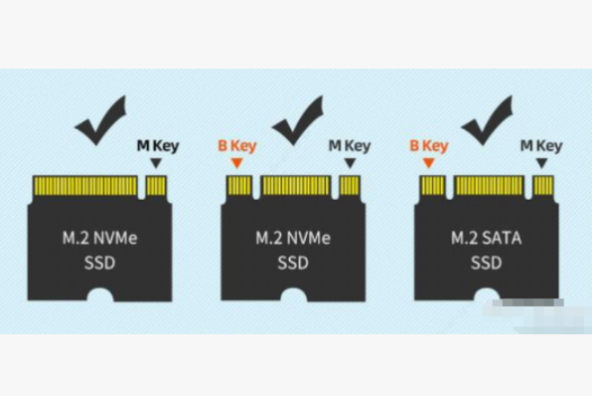
Not all M.2 drives are physically interchangeable. The keying notch determines compatibility:
-
B-Key – Typically used for SATA-based M.2 SSDs.
-
M-Key – Designed for NVMe PCIe drives.
-
E-Key – Reserved for Wi-Fi, Bluetooth, and other wireless modules (not for storage).
SINSMART Recommendation:
Inserting a B-Key drive into an M-Key slot — or vice versa — will result in detection failure. When selecting a drive, check both the protocol and key type to ensure physical and electrical compatibility.
III. Physical Size: 2230, 2242, or 2280
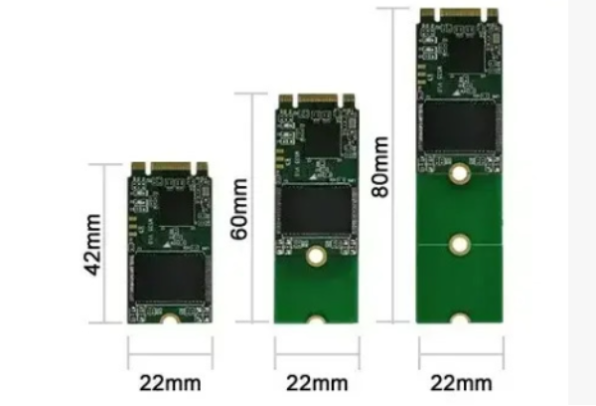
M.2 drives are specified by width × length, such as 2280 (22mm × 80mm) or 2242 (22mm × 42mm). Using the correct size ensures proper fit and secure mounting.
SINSMART Recommendation:
Industrial PCs like rackmount pc, embedded pc often operate under vibration and shock. If the drive is not correctly seated or secured, it may suffer from intermittent connection issues. Always verify that your IPC supports the physical size of the selected M.2 drive and use the proper screw mount points.
IV. Real-World Case Study
One common cause of “drive not detected” errors is signal sharing between M.2 and SATA ports.
-
Observed Issue: M.2 SSD not detected after installation.
-
Root Cause: The board required jumper settings to enable M.2 use since the slot shared a signal path with SATA1.
-
SINSMART Solution: Adjust jumper caps according to the manual to switch the signal correctly, enabling M.2 functionality.
This type of hardware-level troubleshooting is part of the comprehensive support we offer to help customers minimize downtime.

V. Conclusion
With years of industry experience, SINSMART, a professional industrial computer manufacturer, provides not only rugged, high-performance industrial PCs but also end-to-end technical support. From protocol education and product selection to installation guidance and field troubleshooting, our goal is to empower customers with reliable computing platforms that perform flawlessly under harsh conditions.
Choosing SINSMART means choosing reliability, expertise, and peace of mind.


LET'S TALK ABOUT YOUR PROJECTS
- sinsmarttech@gmail.com
-
3F, Block A, Future Research & Innovation Park, Yuhang District, Hangzhou, Zhejiang, China
Our experts will solve them in no time.