
 Rackmount PC
 Embedded Computing
 Industrial Portable Computers
 Rugged Tablets
 Rugged Laptop
 Industrial Panel PC
 Rugged Handheld
 Advantech Industrial PC
Blog
Rugged Handheld Tablet: How to Choose the Right Device for Field Service, Logistics, and Manufacturing
2026-07-28
Table of Contents
- I. Introduction
- II. What Is a Rugged Handheld Tablet?
- III. Start With Workflow and Environment
- IV. Verify Ruggedness Instead of Trusting Labels
- V. Match the OS and Performance to the Application
- VI. Choose Display, Touch, and Ergonomics Together
- VII.Plan Connectivity and Data Capture
- VIII. Design for Shift Uptime and Mounting
- IX. Configure by Industry
- X. Compare Verified SINSMART Reference Models
- XI. FAQ
Introduction
Introduction
Rugged Handheld Tablet selection should begin with the worker’s task, software, and environment—not with the fastest processor on a datasheet. Field technicians need outdoor visibility and dependable cellular positioning. Warehouse teams need fast scanning, stable Wi-Fi roaming, and comfortable all-shift handling. Manufacturing operators may need MES compatibility, sealed construction, industrial ports, and reliable docking.
This workflow-first approach is increasingly important as operations become more data driven. Deloitte’s 2025 Smart Manufacturing Survey, published in 2025 and based on 600 executives, describes sensing, data capture, and automation as prerequisites for deeper operational insight and production efficiency (source). The device in a worker’s hands is often the point where that digital process succeeds or breaks.
The practical answer is simple: define the work, verify the operating conditions, confirm software and peripheral compatibility, then pilot the complete device-and-accessory configuration before buying a fleet.
What Is a Rugged Handheld Tablet?
What Is a Rugged Handheld Tablet?
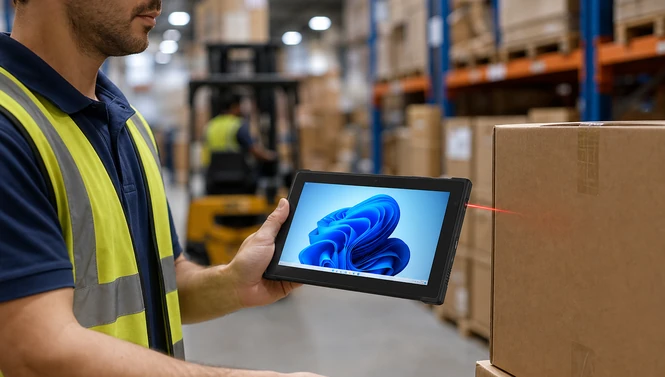
A rugged handheld tablet is a portable computer designed for mobile work where drops, dust, water, vibration, temperature variation, or continuous handling may damage a consumer device. It normally combines a reinforced enclosure with a touch display, wireless communication, cameras, and optional industrial data-capture modules.
“Handheld” does not mean one fixed size. An 8-inch device can suit walking, scanning, and inspection. A 10.1-inch device offers more room for forms, maps, and dashboards while remaining portable. Larger tablets can help with drawings or complex diagnostics but may need a handle, shoulder strap, cart, or vehicle mount.
Before selecting a ruggedized tablet, write one sentence that defines its job:
The user will carry or mount the device, run these applications, capture these data types, connect through these networks, and work for this many hours under these conditions.
That sentence is more useful than a generic request for the “most rugged” model.
Start With Workflow and Environment
Start With Workflow and Environment
Map a full shift before comparing hardware. Observe where the worker carries the device, how often it is picked up, what information is entered, and when it is charged.
Ask these questions:
-
Is the device carried continuously, shared at a station, or mounted in a vehicle?
-
Will users scan hundreds of codes, enter long reports, view drawings, or collect signatures?
-
Is the work indoors, outdoors, in cold storage, near oil or dust, or around vibration?
-
Are gloves, wet hands, bright sun, or low light normal?
-
Which applications, VPNs, browsers, drivers, and MDM tools are mandatory?
-
Is Wi-Fi available everywhere, or is 4G/5G required?
-
Does the shift exceed the realistic battery runtime?
Use the normal environment as the baseline, then document credible worst cases. Selecting for an unlikely extreme can add weight and cost. Selecting only for ideal conditions creates failures in daily work.
Verify Ruggedness Instead of Trusting Labels
Verify Ruggedness Instead of Trusting Labels
Verify Ruggedness Instead of Trusting Labels
An industrial computer can replace fragmented paper entries with structured electronic records, but “digital” does not automatically mean “reliable.” Audit-ready records should show who performed an action, what changed, when it occurred, which equipment and lot were involved, and why a correction was made.
Useful controls include:
-
unique user accounts and role-based permissions;
-
synchronized time across the computer, PLC, server, and inspection devices;
-
read-only raw data where practical;
-
audit trails for changed limits, recipes, and master data;
-
reason codes and electronic approval for corrections;
-
calibration and maintenance references;
-
protected backups and tested restoration;
-
retention periods aligned with applicable requirements; and
-
export formats that remain readable without obsolete software.
The FDA’s Food Traceability Rule FAQ makes an important technology-neutral point: the rule does not prescribe one specific recordkeeping application. That gives processors flexibility, but it also means they must demonstrate that their chosen system keeps required information legible, protected, and available.
Data quality begins at the source. A perfectly secured database cannot repair an incorrectly wired sensor, an uncalibrated scale, or a barcode assigned to the wrong production order. The validation scope must cover the full path from measurement to displayed value, stored record, report, and backup.

Match the OS and Performance to the Application
Match the OS and Performance to the Application
Match the OS and Performance to the Application
Match the OS and Performance to the Application
Choose the operating system before choosing the processor.
A Windows rugged tablet is often the better fit for legacy desktop software, full browser workflows, diagnostic utilities, Windows authentication, database clients, or specialized drivers. Android can be effective for touch-first applications, guided workflows, barcode scanning, and centrally managed mobile deployments. Linux may suit customized industrial or embedded projects, but application and driver support must be confirmed.
Next, size performance for the workload:
|
Workload
|
Typical priority
|
|
Forms, work orders, simple scanning
|
Efficient processor, stable app performance
|
|
Multiple enterprise apps and large browser sessions
|
More memory and storage headroom
|
|
Drawings, diagnostics, local analytics
|
Higher-performance CPU and larger display
|
|
Camera, scanner, or serial-device integration
|
Driver and SDK compatibility
|
Do not approve a configuration because the application launches once. Test login, offline mode, synchronization, printing, scanner input, camera capture, sleep/wake behavior, VPN recovery, and OS update policies.
Choose Display, Touch, and Ergonomics Together
Choose Display, Touch, and Ergonomics Together
Display brightness matters, but brightness alone does not guarantee outdoor readability. Anti-glare treatment, reflections, viewing angle, interface contrast, and direct-sun behavior also matter. Test the actual application outdoors rather than relying only on a nit value.
Touch requirements should state whether users need:
-
Bare-finger input
-
Glove touch
-
Wet-touch operation
-
Passive or active stylus input
-
Signature capture
-
Physical programmable buttons
Ergonomics affect accuracy and adoption. Compare total working weight with the hand strap, scanner, battery, and protective accessories attached. Ask workers to perform repeated scans, climb safely, enter a form, and carry the device for a realistic period.
An 8-inch rugged tablet can favor mobility and high-frequency handling. A 10-inch rugged tablet can provide a better balance for detailed forms, MES screens, maps, and mixed handheld or mounted work.
Plan Connectivity and Data Capture
Plan Connectivity and Data Capture
Plan Connectivity and Data Capture
List every connection the workflow needs. Wi-Fi specifications do not prove reliable operation in a warehouse full of metal racks or a plant with interference. Test roaming between access points, reconnect time, dead zones, latency, and performance while the application synchronizes.
For mobile and outdoor work, consider cellular bands, SIM format, private-network requirements, GPS/GNSS accuracy, Bluetooth peripherals, and offline operation. For machinery or fixed stations, confirm whether native Ethernet, USB, RS232, or a dock is required.
A rugged tablet with barcode scanner should be validated with the real symbols, label sizes, distances, damaged codes, and lighting conditions. Confirm whether the scanner supports the required symbologies and whether its SDK works with the target app. Camera scanning may be adequate for occasional use; a dedicated scan engine is normally better for repetitive warehouse work.
NFC, RFID, fingerprint readers, and cameras should also be treated as workflow components, not check-box features. Test tags, cards, credentials, and software integration before rollout.

Design for Shift Uptime and Mounting
Design for Shift Uptime and Mounting
Design for Shift Uptime and Mounting
Battery capacity is only a starting point. Screen brightness, cellular use, scanning, cold temperatures, application load, and battery age change runtime. Measure a representative shift with the final settings.
For long or multi-shift operations, evaluate:
-
Removable or hot-swappable batteries
-
Charging time and spare-battery ratio
-
Desktop and multi-bay charging
-
Vehicle or forklift power
-
Dock retention and one-handed release
-
Cable strain relief and connector durability
The SIN-I1012E rugged Windows tablet provides one reference configuration with a built-in small battery plus a removable main battery for hot swapping. Its live page also lists optional modular 2D scanning, RJ45, RS232, or USB 2.0 options. Those features can support shift continuity and industrial integration, but the final module combination must be confirmed in the quote.
Configure by Industry
Configure by Industry
Configure by Industry
Field service
The best rugged tablet for field service should prioritize readable outdoor display, GPS/GNSS, cellular coverage, camera quality, glove use, vehicle charging, and compatibility with FSM or CMMS software. A hand strap or shoulder strap helps technicians move between equipment while keeping both hands available when required.
Logistics
A rugged tablet for warehouse logistics should prioritize scan speed, Wi-Fi roaming, ergonomic weight, WMS compatibility, shift-long power, and reliable docks. Forklift workflows also require secure mounting, vibration control, ignition-aware power planning, and a screen position that does not obstruct sightlines.
Manufacturing
A rugged tablet for manufacturing MES should match the MES client, operator login method, barcode traceability, cleaning routine, and machine interfaces. Maintenance users may need Windows, larger screens, Ethernet, or serial connectivity. Line operators may prefer a lighter Android workflow with guided forms and integrated scanning.
SINSMART’s MES data-collection selection guide provides additional workflow examples covering line-side scanning, forklift mounting, maintenance, OS choice, docking, and long-term supply.
Compare Verified SINSMART Reference Models
Compare Verified SINSMART Reference Models
Compare Verified SINSMART Reference Models
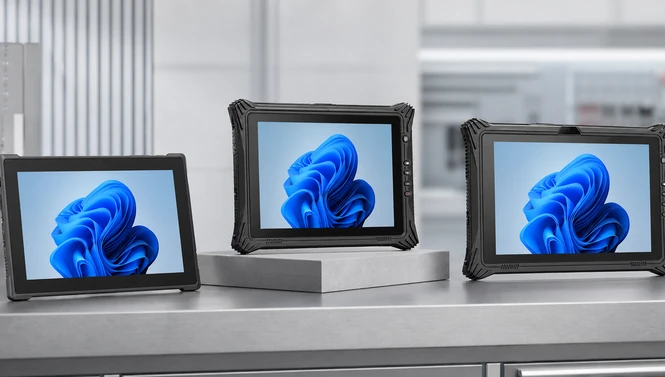
The following examples show three different selection directions. Specifications are limited to fields verified on the live product pages on July 27, 2026.
|
Model
|
Best-fit direction
|
Verified highlights
|
Important qualification
|
|
Portable Windows field or logistics work
|
10.1-inch, 700-nit display; about 930 g; IP67; 1.8 m drop resistance; Windows 11 Home; NFC, fingerprint, and 1D scanning listed
|
2D scanning is listed as unavailable; confirm software edition and cellular configuration
|
|
|
Value-oriented industrial Windows workflow
|
Intel N5105; 10.1-inch 700-nit display; IP65; MIL-STD-810G; 4G; GPS/BeiDou/GLONASS; multiple ports
|
Scanner and hot-swap support are not stated on the opened page
|
|
|
Higher-performance diagnostics, manufacturing, or multi-app work
|
Intel Core i5-1235U/i7-1255U; 10.1-inch 700-nit option; IP65; MIL-STD-810G; Wi-Fi 6; optional 4G; dual-battery hot swap; modular I/O/data capture
|
Heavier at about 1140 g; module choices must be finalized before ordering
|
These are reference configurations, not universal recommendations. Confirm current availability, exact OS image, wireless bands, modules, accessories, certification reports, and sample performance for each project.
FAQ
FAQ
FAQ
Q1: What is the best screen size for a rugged handheld tablet?
Eight inches favors portability and frequent scanning. A 10.1-inch screen is often better for forms, maps, MES pages, and mixed handheld or mounted use. Test the complete working weight and interface.
Q2: Is IP67 always better than IP65?
No. IP67 adds a defined temporary-immersion test, while IP65 addresses dust and water jets. Choose according to actual weather, cleaning, immersion, chemical, and port-cover conditions.
Q3: Does MIL-STD-810H mean a tablet is military certified?
Not by itself. MIL-STD-810H contains environmental test guidance. Ask which methods and procedures were performed and request the relevant test evidence.
Q4: Should field service teams choose Windows or Android?
Choose Windows for desktop-class or legacy diagnostic software and specialized drivers. Choose Android for mobile-first apps, guided forms, and scan-centric workflows when the required apps and MDM support it.
Q5: Is an integrated barcode scanner necessary?
It is usually worthwhile for repetitive scanning. For occasional scans, a camera may be sufficient. Test real barcodes, lighting, distance, damaged labels, symbologies, and application SDK integration.
Q6: What connectivity should a warehouse tablet support?
Prioritize proven Wi-Fi coverage and roaming, then add Bluetooth, cellular, or wired docking as the workflow requires. A site survey and live roaming test are more useful than a radio specification alone.
Q7: When is a hot-swappable battery important?
It is valuable for long shifts, remote sites, shared devices, or operations that cannot pause for charging. Confirm that swapping works while the production application remains stable.
Q8: Can a consumer tablet with a rugged case replace an industrial rugged tablet?
Sometimes for light-duty work, but the complete solution may still lack sealed ports, integrated scanning, industrial docks, wide-temperature data, replaceable batteries, or consistent long-term supply. Compare the real workflow and TCO.
Q9: What should be tested in a rugged tablet pilot?
Test the application, login, scanning, roaming, offline synchronization, battery, touch modes, sunlight readability, mounting, charging, cleaning, updates, and worker ergonomics in representative locations.
Q10: What information should I provide when requesting a quote?
Provide the use case, environment, OS and application, screen size, scanning or RFID needs, wireless bands, ports, battery and mounting requirements, quantity, destination, certifications, and rollout schedule.


LET'S TALK ABOUT YOUR PROJECTS
- sinsmarttech@gmail.com
-
3F, Block A, Future Research & Innovation Park, Yuhang District, Hangzhou, Zhejiang, China
Our experts will solve them in no time.