
 Rackmount PC
 Embedded Computing
 Industrial Portable Computers
 Rugged Tablets
 Rugged Laptop
 Industrial Panel PC
 Rugged Handheld
 Advantech Industrial PC
Sturdy Laptops for Construction Spatial Data Management
Table of Contents
- I. Introduction
- II. Key Spatial Data Tasks That Require Sturdy Laptops
- III. Field Conditions Confirm Why Sturdy Laptops Are Needed
- IV. Top Sturdy Laptops: Key Feature Comparison
- V. Tested Evidence——SIN-S1412E / SIN-S1512E
- VI. Why SIN-S1412E and SIN-S1512E Enhance Spatial Data Reliability
- VII. Benefits of Using Sturdy Laptops
- VIII. Why Common Tablets Fall Short in Spatial Data Work
- IX. Conclusion
- X. FAQ
Introduction
Sturdy Laptops help construction teams manage spatial data accurately when outdoor visibility, vibration, dust, and unstable network conditions affect normal computing work. On modern jobsites, engineers often need to review CAD drawings, BIM layers, GIS maps, coordinate logs, deviation notes, and inspection photos while moving between work zones. If the screen becomes unreadable, the system slows down, or data cannot be synchronized reliably, layout verification and field decisions may be delayed.This guide explains how to choose Sturdy Laptops for construction spatial data management, what specifications matter most, and how SINSMART rugged laptop options support outdoor mapping, drawing review, and field documentation workflows.
Key Spatial Data Tasks That Require Sturdy Laptops
Construction spatial data work is not limited to viewing drawings. Field engineers may need to compare CAD layers, open BIM coordination files, check GIS-based site maps, record GPS positions, review elevation notes, and update inspection photos in the same workflow. These tasks require more than basic office performance. They need stable processing, outdoor-readable screens, reliable connectivity, and a structure that can tolerate dust, vibration, and frequent movement.
Sturdy Laptops are especially useful for the following construction tasks:
| Spatial Data Task | Field Challenge | Why Sturdy Laptops Help |
|---|---|---|
| CAD drawing review | Large files and multiple layers | Stable CPU/RAM and larger display support smoother review |
| BIM model checking | Heavy 3D or coordination files | Better performance reduces freezing during field checks |
| GIS map viewing | Outdoor glare and map detail | High-brightness display improves visibility |
| Coordinate verification | Need reliable positioning and network sync | GPS, 4G/5G, Wi-Fi, and LAN options improve data flow |
| Inspection documentation | Dust, vibration, and long shifts | Rugged structure reduces interruption risk |
| Deviation recording | Fast comparison between plan and site | Multi-window handling supports faster decision-making |

Field Conditions Confirm Why Sturdy Laptops Are Needed
Construction environments challenge electronics with dust, heat, and vibration. The following findings from respected organizations support why reinforced terminals outperform fragile options.
✅ Dust Exposure on Construction Sites
- Construction tasks such as cutting, sanding, drilling, and surface preparation generate significant airborne dust. OSHA’s permissible exposure limits specify that total dust in general industrial settings should not exceed 15 mg/m³ over an 8-hour time-weighted average (TWA), and respirable dust should not exceed 5 mg/m³ over the same period. These limits are used to manage dust exposure and protect respiratory health.
- Dust from concrete, mortar, brick, and stone contains fine particles that can penetrate internal electronics if a terminal is not sealed or reinforced. Reinforced and ruggedized computing solutions such as Sturdy Laptops reduce the risk of dust penetration, leading to fewer system failures and more consistent performance during prolonged site operations.
✅ High temperature resistance in construction work environments
Construction sites typically require long hours of outdoor work, enduring direct sunlight, material heat, and electricity consumption. This means that exposed surfaces and equipment can reach temperatures far exceeding ambient temperatures. Rugged laptops, with enhanced internal airflow and cooling designs, remain stable and responsive even in environments far exceeding normal shaded temperatures.
✅ Vibration Effects on Electronics
- Construction sites frequently involve machinery, concrete breakers, compactors, and vehicle movement, all of which generate vibration across a broad spectrum of frequencies. While there is no single “vibration mg number” in public OSHA standards, OSHA’s regulation on airborne contaminants and environmental hazards (29 CFR 1926.55) establishes that employers must limit employee exposure to hazards including dust and vibration related conditions and requires engineering or administrative controls to minimize those risks. This standard reflects widely accepted workplace safety practice for managing mechanical stresses on workers and equipment alike.
- Independent engineering standards (e.g., IEC vibration guidelines) consistently demonstrate that sustained multi-axis vibration impacts internal joints and soldered connections in unreinforced systems, leading to premature failure.
- Thus, reinforced terminals such as the rugged-style Sturdy Laptops, which incorporate internal mounting support and structural damping, help maintain stable performance in vibration-intensive construction environments.
Top Sturdy Laptops: Key Feature Comparison
To illustrate why SINSMART Sturdy Laptops (e.g., SIN-S1412E / SIN-S1512E series) stand out for construction spatial data tasks, here's a comparison with major rugged brands:
| Feature | SINSMART SIN-S1412E / SIN-S1512E | Panasonic Toughbook | Getac (e.g., B360) | Dell Latitude Rugged |
| Screen Brightness | Up to 1000 nits (optional high-brightness) | Up to 1200 nits | Up to 1400 nits | Up to 1400 nits |
| Operating Temperature | -20°C to +60°C | -29°C to +63°C | -29°C to +63°C | -29°C to +63°C |
| IP Rating | IP65 (full dust/water jet protection) | IP65/IP66 | IP66 | IP53 to IP65 |
| Vibration/Drop Resistance | MIL-STD-810H certified, vibration-resistant assembly | MIL-STD-810H | MIL-STD-810H | MIL-STD-810H |
| Customization & Cost Efficiency | High (ODM/OEM support, flexible configs, superior cost-performance) | Limited modular | Modular options | Good connectivity |
| Best For Construction Spatial Data | Excellent balance of outdoor visibility, thermal stability, and affordability | Premium durability | High brightness | Reliable in field |
SINSMART excels in providing customizable, cost-effective solutions without compromising on essential rugged features—making it ideal for budget-conscious teams needing reliable multi-layer spatial data handling.
Outdoor Visibility
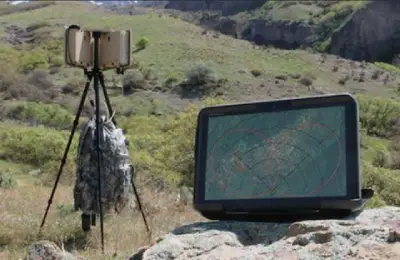
Spatial data review requires brightness strong enough for direct sunlight. Sturdy Laptops typically provide 800–1000 nits of brightness, enabling you to interpret boundaries, offsets, and deviation layers without glare.
Multi-Window Handling
Spatial workflows rely on multiple windows—drawing layers, offset calculations, coordinate logs, elevation notes, and comparison views. Sturdy Laptops maintain responsiveness during these tasks.
High temperature resistance
Weak hardware frequently throttles or shuts down under heat. Sturdy Laptops continue handling drawing layers across the full working day.
Structural Strength
Rough handling, movement across zones, and tool vibration can degrade fragile hardware. Sturdy Laptops withstand these challenges consistently.
Tested Evidence——SIN-S1412E / SIN-S1512E
Temperature Test rough Laptop
| Test Item | Condition | Result |
| Low-temperature run | −20°C for 4 hours, full-screen playback | Stable, no restart or artifacts |
| High-temperature run | 50°C for 4 hours under load | No freeze, no unexpected shutdown |
| Low-temperature storage | −30°C for 24 hours | Normal boot, clear display |
| High-temperature storage | 70°C for 24 hours | Full functional recovery |
Environmental Resistance Table
| Test Item | Standard | Result |
| IP65 spray evaluation | IP-X5 / IP-6X | No water or dust intrusion |
| Vibration evaluation | 5–500 Hz, X/Y/Z | No functional instability |
| Humidity cycle | 30°C–60°C at 95% RH | No visual or operational faults |
| Drop test | Packaging drop test | Structure remains intact |
Why SIN-S1412E/SIN-S1512E Enhance Spatial Data Reliability
This section applies the test evidence directly to spatial data workflows.
Visibility for Mapping Layers
The brightness available in these reinforced laptops helps you interpret offsets, compare layers, and review coordinates even in midday conditions.
Temperature Stability
You can continue field measurements as temperatures shift without worrying about shutdowns or dim screens.
Multi-Window Efficiency
Spatial data tasks involve several simultaneous windows. Sturdy Laptops sustain smooth transitions between layers and comparison views.
Vibration-Resistant Performance
You can navigate maps and update logs while moving between inspection points without losing stability.
If your tasks depend on outdoor clarity, thermal readiness, and continuous multi-layer responsiveness,
ask our specialists how Sturdy Laptops such as SIN-S1412E/SIN-S1512E fit your workflow.

Benefits of Using Sturdy Laptops
More Accurate Field Reviews
Drawing layers and dimensions remain visible under sunlight.
Less Repetition
You spend fewer hours rechecking coordinates or boundaries.
Lower Stress on Field Teams
Long shifts remain manageable with stable drawing visibility.
Better Control of Workflow Timing
Reliable hardware reduces delays caused by display or performance issues.
Why Common Tablets Fall Short in Spatial Data Work
Insufficient Brightness
Screens below 500 nits limit you during outdoor tasks.
Thermal Weakness
Many units cannot operate during sustained heat.
Low Structural Endurance
Vibration and rough conditions degrade performance quickly.
Reduced Multi-Layer Capabilities
Complex drawing layers may freeze or load slowly.
For buyers who want to compare screen sizes, CPU options, protection levels, and expansion interfaces across different field models, the SINSMART rugged laptop category provides a broader starting point for construction and industrial mobile computing projects.
Conclusion
Accurate spatial data management depends on tools that remain readable, stable, and responsive under real construction conditions. Dust exposure, vibration, long outdoor hours, and temperature shifts are not edge cases—they are daily realities on active sites. Sturdy Laptops address these realities through reinforced structure, outdoor-level brightness, thermal stability, and consistent multi-window performance.For teams responsible for boundary alignment, offset verification, layer comparison, and on-site documentation, reliable hardware directly protects accuracy and workflow continuity. Solutions such as SIN-S1412E and SIN-S1512E demonstrate how reinforced laptops support spatial data tasks without interruptions caused by glare, heat, or vibration.By choosing Sturdy Laptops designed for construction environments, you reduce rework, maintain data clarity, and keep your spatial workflows moving forward—exactly where precision matters most.If you want to compare current sizes, operating systems, and expansion directions first, you can start from the rugged laptop category page.
FAQ
Q1. Are Sturdy Laptops suitable for CAD drawings on construction sites?
A.Yes. Sturdy Laptops with Windows OS, Intel Core processors, SSD storage, and 16GB or 32GB memory are suitable for reviewing CAD drawings and construction documents in the field. For large BIM models or heavy 3D work, buyers should confirm software requirements before choosing the CPU, memory, and graphics configuration.
Q2. Why are Sturdy Laptops better than common laptops for spatial data management?
A.Common laptops may work in an office, but construction spatial data tasks often happen under sunlight, dust, vibration, and temperature changes. Sturdy Laptops are designed with brighter displays, stronger structures, sealed protection, and more industrial connectivity, helping teams keep drawings, maps, and coordinate records accessible on site.
Q3. What screen brightness is recommended for Sturdy Laptops used outdoors?
A.For construction sites, 700 nits or higher is generally more practical than standard office-level brightness. A 1000-nit display can make CAD layers, GIS maps, and inspection photos easier to read under strong daylight.
Q4. Do Sturdy Laptops need IP65 protection for construction work?
A.IP65 protection is useful when laptops are exposed to dust, splashes, or outdoor work zones. It does not mean the laptop should be submerged in water, but it helps reduce risks from dust entry and water spray during normal construction field use.
Q5. Can Sturdy Laptops support BIM and GIS workflows?
A.Yes, Sturdy Laptops can support BIM and GIS workflows when configured with suitable CPU, memory, SSD storage, and Windows compatibility. For teams using large models, point cloud files, or multiple map layers, 32GB memory and stable thermal performance are recommended.
Q6. What connectivity should construction teams check before buying Sturdy Laptops?
A.Construction teams should check Wi-Fi, Bluetooth, GPS, 4G/5G options, RJ45, USB, HDMI, RS232, and Type-C interfaces. These connections help with positioning, cloud synchronization, external displays, survey accessories, and field equipment integration.
Q7. Are Sturdy Laptops useful for survey and layout teams?
A.Yes. Survey and layout teams often need reliable access to drawings, coordinates, deviation notes, and inspection records. Sturdy Laptops help these teams work more consistently in dusty, bright, and vibration-prone environments.
Q8. Should buyers choose a 14-inch or 15.6-inch Sturdy Laptop?
A.A 14-inch model is better when mobility and lighter carrying are priorities. A 15.6-inch model is better when the user needs more screen space for CAD drawings, BIM layers, GIS maps, or multi-window comparison.


LET'S TALK ABOUT YOUR PROJECTS
- sinsmarttech@gmail.com
-
3F, Block A, Future Research & Innovation Park, Yuhang District, Hangzhou, Zhejiang, China
Our experts will solve them in no time.