
 Rackmount PC
 Embedded Computing
 Industrial Portable Computers
 Rugged Tablets
 Rugged Laptop
 Industrial Panel PC
 Rugged Handheld
 Advantech Industrial PC
Fully-Rugged vs. Semi-Rugged Laptops: Which Rugged Laptop Is Right for Industrial Field Work?
Table of Contents
- I. Introduction
- II. Quick Answer: Fully-Rugged vs. Semi-Rugged Laptops
- III. What Is a Semi-Rugged Laptop?
- IV. What Is a Fully-Rugged Laptop?
- V. Fully-Rugged vs. Semi-Rugged Laptops: Quick Comparison
- VI. Key Differences That Matter in Real Work
- VII.Which Rugged Laptop Should You Choose by Industry?
- VIII. Recommended SINSMART Rugged Laptop Models
- IX. Buying Checklist for B2B Rugged Laptop Projects
- X. FAQ
Introduction
Introduction
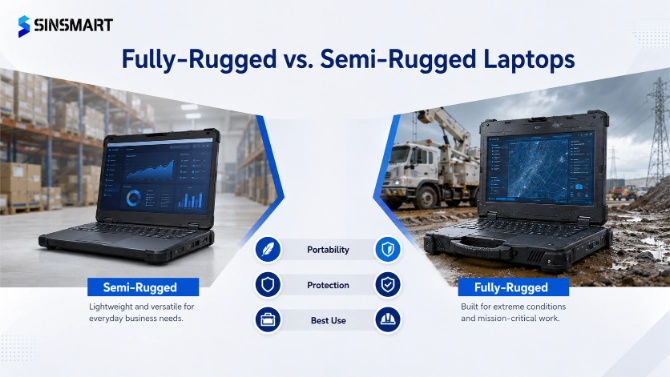
Quick Answer: Fully-Rugged vs. Semi-Rugged Laptops
Quick Answer: Fully-Rugged vs. Semi-Rugged Laptops
| Laptop Type | Best For | Main Advantage | Main Limitation |
| Semi-rugged laptop |
Warehouses, light field service, factory maintenance, vehicle diagnostics, mobile business work |
Better balance of durability, portability, and cost |
Not ideal for long-term exposure to harsh outdoor environments |
| Fully-rugged laptop |
Utilities, construction, mining, transportation, public safety, energy, heavy industry, outdoor field work |
Higher protection against dust, water, vibration, drops, and temperature changes |
Usually heavier and higher in upfront cost |
What Is a Semi-Rugged Laptop?
What Is a Semi-Rugged Laptop?
-
Warehouse and logistics operations
-
Manufacturing equipment maintenance
-
Automotive diagnostics
-
Field service and repair
-
Construction site management
-
Mobile inspection and documentation
-
Public utility work in moderate conditions
What Is a Fully-Rugged Laptop?
What Is a Fully-Rugged Laptop?
Fully-Rugged vs. Semi-Rugged Laptops: Quick Comparison
Fully-Rugged vs. Semi-Rugged Laptops: Quick Comparison
Fully-Rugged vs. Semi-Rugged Laptops: Quick Comparison
Fully-Rugged vs. Semi-Rugged Laptops: Quick Comparison
Fully-Rugged vs. Semi-Rugged Laptops: Quick Comparison
| Comparison Factor | Semi-Rugged Laptop | Fully-Rugged Laptop |
| Rugged level | Light to medium protection | High-level protection for harsh environments |
| Typical IP rating | Often IP53/IP54/IP65, depending on model | Often IP65/IP66 or higher, depending on model |
| Drop protection | Suitable for bumps and occasional drops | Better for frequent drops and rough handling |
| Dust and water resistance | Suitable for moderate dust, splashes, and indoor industrial use | Better for rain, mud, dust, and outdoor exposure |
| Vibration resistance | Good for mobile work and light vehicle use | Better for vehicle-mounted, railway, heavy machinery, or field use |
| Temperature range | Suitable for moderate working environments | Better for wider temperature changes |
| Display | Standard or high-brightness options | Often sunlight-readable, high-brightness, glove-touch options |
| Battery | Standard or dual-battery options | Often supports long shifts and hot-swappable battery designs |
| Weight | Usually lighter | Usually heavier due to stronger protection |
| Upfront cost | Lower | Higher |
| Best users | Warehouse teams, technicians, mobile workers, light industrial users | Field engineers, public safety teams, utilities, mining, transport, heavy industry |

Key Differences That Matter in Real Work
Key Differences That Matter in Real Work
Key Differences That Matter in Real Work
Key Differences That Matter in Real Work
IP Rating: Dust and Water Protection
-
IP53/IP54 may be suitable for light dust and limited moisture.
-
IP65 provides stronger dust and water resistance for harsher industrial and outdoor use.
-
IP66 is better suited for environments with stronger water exposure, heavy dust, or more severe field conditions.
MIL-STD Testing and Drop Resistance
-
How often will the laptop be dropped?
-
Will workers carry it while climbing, repairing, or moving between sites?
-
Will the laptop be mounted inside a vehicle or forklift?
-
Will it operate near heavy machinery?
-
What is the required drop height?
Display Brightness and Outdoor Readability
Battery Life and Hot-Swappable Design
Industrial I/O and Field Connectivity
-
USB 2.0 / USB 3.0 / USB 3.2
-
Type-C or Thunderbolt 4
-
HDMI or mini HDMI
-
RJ45 LAN ports
-
RS232 / RS485 serial ports
-
SIM / TF card slots
-
Pogo pin docking
-
GPS / 4G / 5G / Wi-Fi / Bluetooth
-
NFC and fingerprint options

Which Rugged Laptop Should You Choose by Industry?
Which Rugged Laptop Should You Choose by Industry?
| Industry / Scenario | Suggested Choice | Why |
| Warehouse and logistics |
Semi-rugged laptop for indoor warehouse; fully-rugged laptop for forklift, cold chain, and outdoor loading |
Warehouse work may involve drops, vibration, barcode systems, and temperature changes |
| Manufacturing maintenance | Semi-rugged or fully-rugged laptop |
Depends on dust, oil mist, vibration, and machine-side operation |
| Automotive diagnostics |
Semi-rugged laptop for workshop use; fully-rugged laptop for outdoor or heavy-duty service |
Requires ports, stable Windows support, and resistance to workshop conditions |
| Utilities and power maintenance | Fully-rugged laptop |
Outdoor sites, rain, dust, temperature changes, and long shifts increase failure risk |
| Construction sites | Fully-rugged laptop | Dust, rain, drops, vibration, and rough handling are common |
| Public safety and emergency response | Fully-rugged laptop | Reliability, mobility, and uninterrupted operation are critical |
| Mining, oil, and gas |
Fully-rugged laptop; verify certification requirements carefully |
Dust, shock, vibration, wide temperature range, and safety requirements are higher |
| Transportation and railway | Fully-rugged laptop |
Vehicle vibration, outdoor maintenance, and mobile operations require stronger protection |

Recommended SINSMART Rugged Laptop Models
Recommended SINSMART Rugged Laptop Models
Recommended SINSMART Rugged Laptop Models
| Model | Screen | Processor | Memory / Storage | Rugged Features | Best For |
| SIN-S1311EB | 13.3-inch FHD | Intel® i5-1135G7 | 8GB/16GB; 256GB/512GB |
IP65, MIL-STD-810G, 1.22m drop resistance, -20°C to 60°C |
Warehouse, surveying, utilities, transportation |
|
14 / 15.6-inch FHD, 1,000 nits |
Intel® Core™ i5-1235U / i7-1255U |
16GB/32GB; 256GB SSD |
IP65, MIL-STD design, 5G + Wi-Fi, rich I/O |
Industrial field work, mobile inspection, outdoor data collection |
|
| SIN-S1414E |
14-inch FHD, 1,000 nits |
Intel Meteor Lake-H i5-125H; optional i7-155H |
16GB DDR5; optional 32GB; 256GB SSD |
IP65, MIL-STD-810H, 1.2m drop, hot-swappable battery, Thunderbolt 4 |
AI-assisted inspection, automotive diagnostics, field service |
| SIN-S1514E |
15.6-inch FHD, 1,000 nits |
Intel Meteor Lake-H i5-125H; optional i7-155H |
16GB DDR5; optional 32GB; 256GB SSD |
IP65, MIL-STD-810H, 1.2m drop, 56Wh + 14.4Wh battery |
Large-screen field diagnostics, long-shift industrial work |
| SIN-S1508E | 15.6-inch FHD |
Intel® Core™ i5-8250U / i7-8550U |
8GB/16GB; 256GB/512GB |
IP65, MIL-STD-810G, -10°C to 50°C, 6.5h listed endurance |
Warehouse, public utilities, transportation, energy |
| SIN-X1511G |
15.6-inch, 1,000 nits |
11th Gen Core i9/i7/i5 options |
16GB DDR4; optional 32GB/64GB; 512GB PCIe SSD options |
IP66, MIL-STD-810H, MIL-STD-461G |
Transportation, industrial manufacturing, automotive, public safety, defense-related field use |
Buying Checklist for B2B Rugged Laptop Projects
Buying Checklist for B2B Rugged Laptop Projects
Buying Checklist for B2B Rugged Laptop Projects
| Question | Why It Matters |
| Will the laptop be used indoors, outdoors, or both? | Determines the required rugged level |
| Is there frequent dust, rain, water spray, oil mist, or mud? | Helps define IP rating |
| Will the laptop be dropped or carried during field movement? | Determines drop protection |
| Will it be mounted in a vehicle, forklift, or service truck? | Requires vibration and shock resistance |
| What temperature range will the laptop face? | Determines environmental suitability |
| Does the screen need to be readable under sunlight? | Helps define brightness and anti-glare needs |
| Will users wear gloves? | Determines touch panel requirements |
| What software must the laptop run? | Determines CPU, memory, storage, GPU, and OS |
| What field devices must connect to the laptop? | Determines USB, LAN, COM, HDMI, RS232/RS485, and docking requirements |
| Is 4G, 5G, GPS, NFC, or fingerprint required? | Determines wireless and security modules |
| Is OEM/ODM customization needed? | Determines supplier capability |
| Is the project a batch deployment? | Requires stable supply, after-sales support, and long-term availability |

FAQ About Fanless Embedded PCs for Dusty Production Environments
FAQ About Fanless Embedded PCs for Dusty Production Environments
FAQ About Fanless Embedded PCs for Dusty Production Environments
Q1. What is the main difference between fully-rugged and semi-rugged laptops?
A: A semi-rugged laptop is built for light to moderate industrial environments, while a fully-rugged laptop is built for harsher outdoor and field conditions. The main differences are usually IP rating, drop resistance, sealing, vibration protection, operating temperature range, battery design, and industrial I/O.
Q2. Is a semi-rugged laptop enough for warehouse work?
A: Yes, in many indoor warehouse environments, a semi-rugged laptop can be enough. However, cold storage, forklift mounting, outdoor loading, heavy vibration, or frequent drops may require a fully-rugged laptop or a rugged tablet solution.
Q3. Is a fully-rugged laptop always better?
A:Not always. A fully-rugged laptop offers stronger protection, but it may also be heavier and more expensive. If your work environment is only moderately harsh, a semi-rugged laptop may provide better cost efficiency.
Q4. What rugged laptop level is better for field service?
A: For light field service, a semi-rugged laptop may be enough. For utilities, construction, transportation, public safety, mining, oil and gas, or long outdoor shifts, a fully-rugged laptop is usually the better choice.
Q5. Can SINSMART customize rugged laptops for industrial projects?
A: Yes. SINSMART supports OEM/ODM customization, including hardware configuration, I/O ports, operating system, wireless modules, GPS, NFC, fingerprint, logo, BIOS settings, interface control, and project-specific rugged computing solutions.
Q6. How long does a rugged laptop usually last in industrial environments?
A: The service life of a rugged laptop depends on the working environment, usage frequency, maintenance, and hardware configuration. In many industrial projects, a properly selected rugged laptop can provide longer service life than a commercial laptop because it is designed for vibration, dust, moisture, temperature changes, and field movement. For harsh outdoor work, choosing the right rugged level is important to reduce repair frequency and downtime.
Q7. Should I choose a rugged laptop or a rugged tablet for field work?
A: Choose a rugged laptop if your workers need a physical keyboard, Windows software, complex data entry, engineering tools, diagnostic programs, or multiple industrial ports. Choose a rugged tablet if the task is mainly mobile inspection, barcode scanning, form filling, GPS tracking, or handheld data collection. For many industrial projects, rugged laptops and rugged tablets can also be deployed together.
Q8. What operating systems do rugged laptops support?
A: Many rugged laptops support Windows 10, Windows 11, and selected Linux systems, depending on the model and project requirements. For industrial buyers, the operating system should be selected based on software compatibility, driver support, security requirements, and long-term deployment needs. SINSMART can help buyers match rugged laptop hardware with the required operating system environment.


LET'S TALK ABOUT YOUR PROJECTS
- sinsmarttech@gmail.com
-
3F, Block A, Future Research & Innovation Park, Yuhang District, Hangzhou, Zhejiang, China
Our experts will solve them in no time.